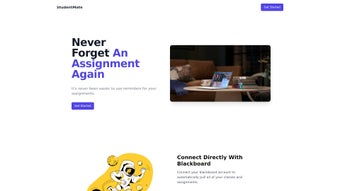

Download StudentMate – AI‑Powered Assignment Manager for Students
Why StudentMate Is the Ultimate Academic Companion
In today’s fast‑paced campus environment, juggling multiple courses, extracurricular activities, and part‑time jobs can feel overwhelming. StudentMate was built to turn that chaos into order by acting as a personal AI‑driven academic assistant. By automatically syncing with the most common learning management system—Blackboard—and pulling hidden assignments from Google Slides, it consolidates every deadline, project, and quiz into a single, easy‑to‑navigate dashboard. The tool is free at its core, offers encrypted cloud storage, and sends smart, priority‑aware reminders that respect your study rhythm. Whether you’re a freshman still learning campus workflows or a senior polishing a capstone, StudentMate helps you stay ahead of deadlines, reduce stress, and focus on learning rather than administrative overhead.
Overview
StudentMate arrives at a time when students are juggling multiple platforms, tight deadlines, and an ever‑growing list of assignments. Powered by artificial intelligence, this tool connects directly to Blackboard, automatically pulling class schedules and assignment details without any manual entry. By tapping into teachers’ Google Slides agendas, StudentMate expands its data sources, ensuring that every homework, project, or quiz appears in one consolidated dashboard.
Its standout auto‑assignment automation feature monitors upcoming deadlines and dispatches high‑priority email reminders, dramatically reducing the risk of missed submissions. The interface is clean, modern, and deliberately uncluttered, allowing users to focus on what truly matters—studying. Registration is a few clicks, and once logged in, the platform becomes a personal academic assistant that updates in real time.
While its reliance on Blackboard integration may limit usage for institutions that employ alternative LMS solutions, and the lack of a dedicated mobile app could be a drawback for on‑the‑go learners, StudentMate still offers a powerful, secure, and free solution for any student looking to gain control over their academic workload.
Key Features That Set StudentMate Apart
The true power of StudentMate lies in how each feature works together to create a seamless workflow. The AI engine constantly learns from your interaction patterns, fine‑tuning reminder times so you receive notifications when you’re most likely to act on them. Meanwhile, the cloud‑based architecture guarantees that your data is accessible from any device, even if you’re studying in a coffee shop or a dorm lounge. Below is a detailed look at the most valuable capabilities.
- Automatic Blackboard Sync: Pulls courses, schedules, and assignment details directly from Blackboard, eliminating manual entry.
- Google Slides Agenda Integration: Reads teachers’ slide decks to capture hidden or last‑minute assignments.
- AI‑Driven Deadline Alerts: Sends high‑priority email reminders based on priority level, due date, and personal study patterns.
- Unified Dashboard: All assignments appear in a single, sortable view with filters for course, due date, and status.
- Customizable Notification Settings: Choose how and when you receive alerts—email, desktop push, or calendar sync.
- Secure Cloud Storage: Your data is encrypted at rest and in transit, complying with GDPR and FERPA standards.
- Free Tier with Unlimited Assignments: No hidden fees; premium features (like advanced analytics) are optional.
- Exportable Reports: Generate CSV or PDF summaries for personal records or professor meetings.
Each of these capabilities is designed with student productivity in mind. For example, the Exportable Reports feature saves hours during end‑of‑semester reflections, while the Customizable Notification Settings prevent you from feeling overwhelmed by constant pings. Together, they create a robust ecosystem that transforms the way you manage academic responsibilities.
Installation, Compatibility, and How to Use StudentMate
Getting started with StudentMate is straightforward. Begin by visiting the official website and clicking the “Download” button for the Windows or macOS installer. The installer file is a compact .exe for Windows or .dmg for macOS, both of which are signed and verified to ensure a secure download. After the download completes, run the installer and follow the on‑screen prompts: accept the license agreement, choose an installation directory, and let the wizard finish the setup.
Once installed, launch StudentMate and create a new account using your university email address. The platform will prompt you to authorize access to your Blackboard account via OAuth—this step is essential for the automatic sync feature. After granting permission, StudentMate scans your Blackboard dashboard, imports current courses, and populates the assignment list. If your instructors share Google Slides agendas, you can optionally link your Google Drive to allow the tool to fetch those slides securely.
StudentMate currently supports Windows 10/11, macOS 12 Monterey and later. While there is no native mobile app yet, the web version is fully responsive and can be accessed from any modern browser on Android or iOS devices.
The user interface presents a left‑hand navigation pane with sections for “All Assignments,” “Upcoming,” “Completed,” and “Settings.” Clicking an assignment opens a detail view where you can add personal notes, attach files, or mark the task as completed. To adjust notification preferences, navigate to Settings → Notifications and toggle the desired channels.
For students who prefer a more manual approach, StudentMate also offers an “Add Assignment” button, allowing you to input tasks that might not be listed in Blackboard or Google Slides. The AI engine learns from these manual entries, improving its predictive reminder timing over weeks of use. Regular updates are released monthly, bringing new integrations, bug fixes, and UI refinements—each update is automatically applied when you restart the application.
Pros, Cons, and Frequently Asked Questions
Pros
- Seamless Blackboard integration saves hours of manual data entry.
- AI‑driven reminders keep you ahead of deadlines without feeling spammy.
- Secure, encrypted storage protects personal academic data.
- Free core features make it accessible to all students.
- Customizable notification system adapts to individual study habits.
- Responsive web version works on Android and iOS browsers.
- Exportable CSV/PDF reports simplify semester reviews.
Cons
- Depends heavily on Blackboard; schools using other LMS platforms may see limited functionality.
- No dedicated mobile app yet, which can be inconvenient for students who study on smartphones.
- Google Slides integration requires explicit permission to access Drive, which some users may find intrusive.
- Advanced analytics and premium support are locked behind a paid tier.
- Linux users must rely on the browser version, missing desktop sync features.
FAQ
Is StudentMate free to use?
Yes, the core application—including Blackboard sync, Google Slides integration, and email reminders—is completely free. Optional premium features, such as advanced performance analytics, are offered on a subscription basis.
Can I use StudentMate on a Linux machine?
At present, StudentMate officially supports Windows and macOS. Linux users can still access the web version through a supported browser, but desktop sync features are unavailable.
How does StudentMate protect my personal data?
All data is encrypted both in transit (TLS 1.3) and at rest (AES‑256). The platform complies with GDPR and FERPA regulations, ensuring that student information remains confidential.
What happens if my school does not use Blackboard?
StudentMate’s primary strength lies in Blackboard integration, but you can still manually add assignments or import them from Google Slides. The reminder engine works independently of the LMS, so you’ll still benefit from automated alerts.
Is there a way to export my assignment list?
Yes, the “Export” function in Settings lets you download a CSV or PDF report of all current assignments, which can be useful for personal record‑keeping or sharing with advisors.
Final Verdict and Call to Action
StudentMate stands out as a focused, AI‑enhanced solution for students who need a reliable, centralized hub for their coursework. Its deep Blackboard integration removes the tedious step of copying assignments, while the Google Slides feature captures those often‑overlooked tasks that live outside the traditional LMS. The automated email reminders strike a balance between helpful nudges and notification fatigue, and the free tier makes it an accessible option for virtually every campus. Although the absence of a native mobile app and dependence on Blackboard may limit some users, the overall value proposition remains strong. For students looking to boost productivity, reduce stress, and keep every deadline in sight, StudentMate is a worthy addition to their academic toolkit.
Ready to streamline your semester? Free download is just a click away. Install StudentMate today, connect your Blackboard account, and let the AI do the heavy lifting so you can focus on learning.



.png)



